Consultation details and list of waiting tickets
1. Consultation details
When a visitor is in consultation, their information is displayed to the right of the buttons.
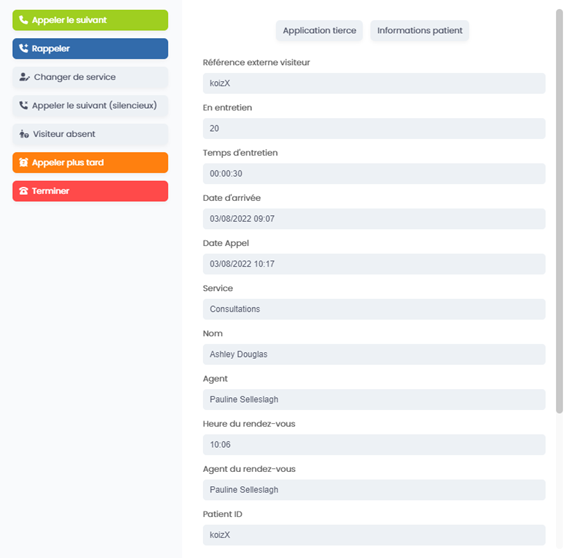
These details are:
o The visitor external reference
o The consultation number
o The consultation time
- It turns red when the time is too long
- This time is configurable
o The arrival date
o The call date
o The service
o The name
o The agent
o The appointment time
o The patient ID
o The reason for their consultation
o A comment
2. The list of waiting tickets
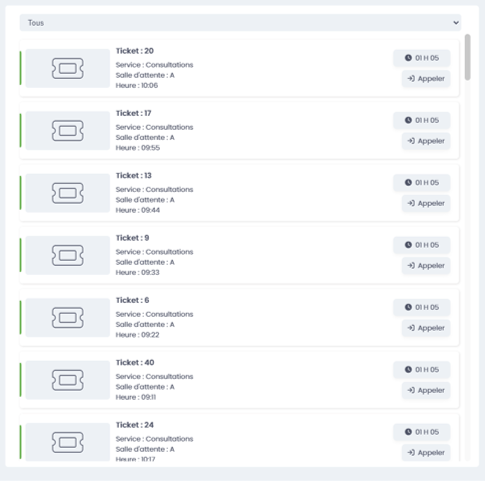
To the right of the column with the details of the ongoing consultation is the list of waiting tickets.
Per ticket, you find:
o The ticket number
o The service
o The waiting room
o The consultation time (only if the information is provided)
o The waiting time
o A button to call the visitor: If you want to call a visitor other than the one at the top of your queue, you can call them via this button.
Display of unregistered appointments
Depending on your EasyQueue configuration, an option at the top left lets you display unregistered appointments in the waiting ticket list.
